3D Print Calculator Web / Order
Reference / explanationUnderstand target margin and rounding
Version 1.5 · Updated · View changes
Margin is the profit share of the selling price.
Screenshots use sample data. Your prices, license level and settings may differ.
When to use this reference
Use this reference when interpreting the target margin, rounded price and displayed profit.
Key concepts
- Enter a Target profit margin in Pricing. Margin differs from markup: a 40% margin means 40% of the selling price remains after the calculated cost.
- Choose no rounding, nearest whole dollar, round up or round down.
- Review the displayed margin as well as the price. Rounding can change the actual margin.
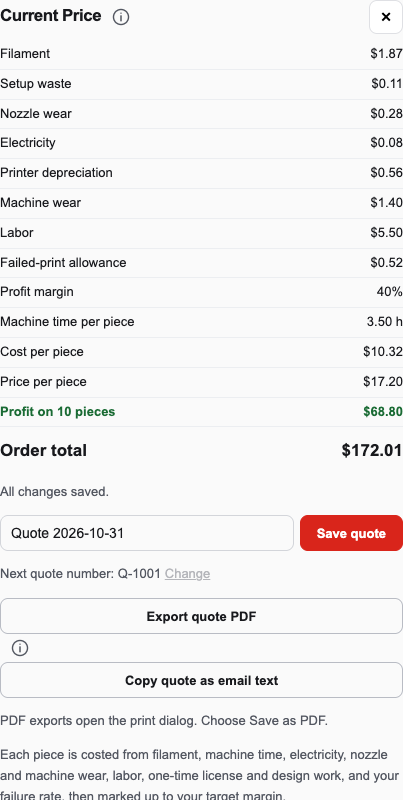
Compare the displayed profit margin, price per piece and quote total after changing margin or rounding. Open full size - Internal cost and profit figures are for your review; the quote PDF contains customer pricing.
How to interpret the result
Read the displayed actual margin after rounding. Margin measures profit as a share of the selling price, so it differs from a markup on cost.
Limits and assumptions
- The result depends on the entered costs, quantities and failure assumptions.
- Rounding can move the actual margin away from the target.
Related help
Use the related workflow guides or create a support ticket if a result does not match the entered assumptions.
Workflow at a glance
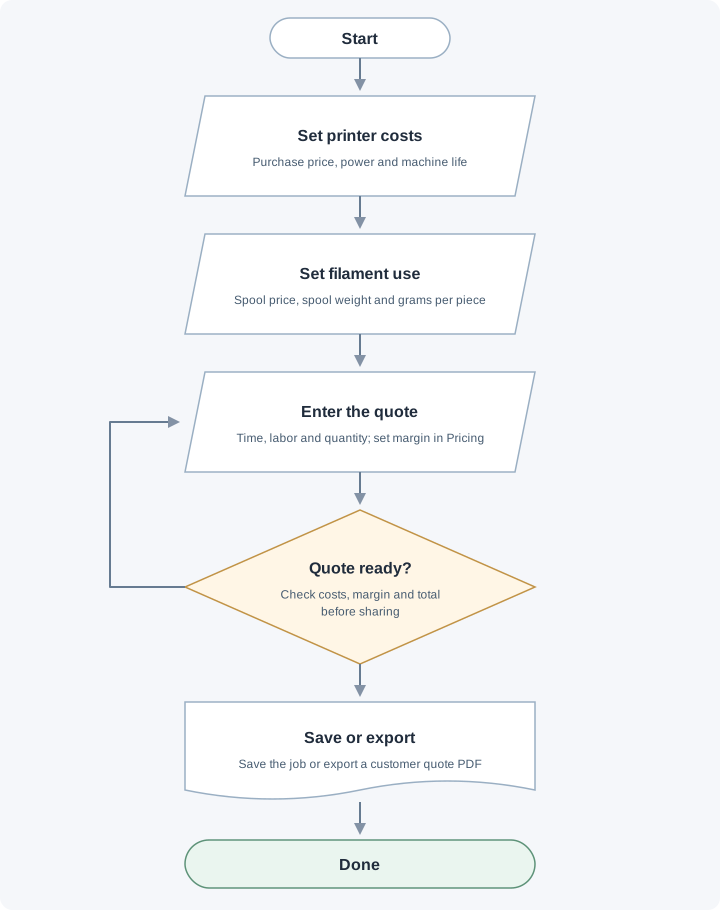
Set printer costs and filament use, enter the quote, then review costs and margin. Revise the quote if needed before saving or exporting the quote.
Formulas and worked examples
All amounts must use the same currency. Convert percentages to fractions when a formula uses a rate: 40% = 0.40.
Price and profit
Expected unit cost
Unit cost = Repeatable cost per success + One-time allocation per piece
TeX source
C_{\mathrm{unit}}=C_{\mathrm{success}}+A_{\mathrm{piece}}Worked example: $10 of repeatable cost plus a $2 allocation gives a $12 expected cost per piece.
Repeatable costs include filament, setup waste, nozzle wear, electricity, printer depreciation, machine wear and labor. This is a modeled cost from your inputs.
Live Excel example · edit inputs and see results
Blue cells are editable. Results recalculate as you type. Each example is a separate sheet; percentages entered as inputs use whole numbers, such as 40 for 40%.
| A · Description | B · Value / result | Excel formula in B | |
|---|---|---|---|
| 1 | Repeatable cost per success ($) | Editable input | |
| 2 | One-time allocation per piece ($) | Editable input | |
| 3 | Expected unit cost ($) | =B1+B2 |
Use these examples to learn the formula. They do not change your saved quote. Division by zero shows a message instead of a misleading number.
Selling price for a target margin
Selling price = Unit cost ÷ (1 − Target margin)
TeX source
P=\frac{C_{\mathrm{unit}}}{1-m}Worked example: At a $10 cost and 40% target margin: $10 ÷ 0.60 = $16.666… before display rounding.
Use a fraction for margin: 40% = 0.40. Margin must be below 100%; the app caps its calculation at 99.9%.
Live Excel example · edit inputs and see results
Blue cells are editable. Results recalculate as you type. Each example is a separate sheet; percentages entered as inputs use whole numbers, such as 40 for 40%.
| A · Description | B · Value / result | Excel formula in B | |
|---|---|---|---|
| 1 | Unit cost ($) | Editable input | |
| 2 | Target margin (%) | Editable input | |
| 3 | Selling price ($) | =IFERROR(B1/(1-B2/100),"Not defined") |
Use these examples to learn the formula. They do not change your saved quote. Division by zero shows a message instead of a misleading number.
Profit and profit margin
Profit per piece = Selling price − Unit cost
Profit margin (%) = Profit per piece ÷ Selling price × 100
TeX source
\mathrm{Profit}=P-C_{\mathrm{unit}} \\ \mathrm{Margin}(\%)=\frac{\mathrm{Profit}}{P}\times100Worked example: Selling at $20 with a $12 cost leaves $8 profit. Margin = $8 ÷ $20 × 100 = 40%.
Margin is undefined when selling price is zero. The displayed profit is based on the modeled costs, not a guarantee of business net income.
Live Excel example · edit inputs and see results
Blue cells are editable. Results recalculate as you type. Each example is a separate sheet; percentages entered as inputs use whole numbers, such as 40 for 40%.
| A · Description | B · Value / result | Excel formula in B | |
|---|---|---|---|
| 1 | Unit cost ($) | Editable input | |
| 2 | Selling price ($) | Editable input | |
| 3 | Profit per piece ($) | =B2-B1 | |
| 4 | Profit margin | =IFERROR(B3/B2,"Not defined") |
Use these examples to learn the formula. They do not change your saved quote. Division by zero shows a message instead of a misleading number.
Markup is different from margin
Markup (%) = (Selling price − Unit cost) ÷ Unit cost × 100
TeX source
\mathrm{Markup}(\%)=\frac{P-C_{\mathrm{unit}}}{C_{\mathrm{unit}}}\times100Worked example: A $12 cost sold at $20 has a 66.7% markup and a 40% margin. A 40% markup on $12 gives a $16.80 price and only a 28.6% margin.
Markup divides by cost; margin divides by selling price. Markup is undefined when cost is zero.
Live Excel example · edit inputs and see results
Blue cells are editable. Results recalculate as you type. Each example is a separate sheet; percentages entered as inputs use whole numbers, such as 40 for 40%.
| A · Description | B · Value / result | Excel formula in B | |
|---|---|---|---|
| 1 | Unit cost ($) | Editable input | |
| 2 | Selling price ($) | Editable input | |
| 3 | Markup | =IFERROR((B2-B1)/B1,"Not defined") |
Use these examples to learn the formula. They do not change your saved quote. Division by zero shows a message instead of a misleading number.
Order revenue and profit
Order revenue = Unit selling price × Quantity + PREPAY freight
Order profit = Order revenue − (Unit cost excluding freight × Quantity + Freight)
TeX source
R=Pq+F \\ C_{\mathrm{order}}=C_{\mathrm{unit}}q+F \\ \mathrm{Order\ profit}=R-C_{\mathrm{order}}Worked example: 10 pieces at $20 each plus $15 freight give a $215 quote total. A $12 unit cost and $15 freight expense leave $80 profit.
The app rounds the whole order price when rounding is enabled, then derives unit price from that total. Rounding can change the actual margin. Freight is added once without markup; COLLECT and pickup add no freight charge. In these formulas, unit cost excludes freight.
Live Excel example · edit inputs and see results
Blue cells are editable. Results recalculate as you type. Each example is a separate sheet; percentages entered as inputs use whole numbers, such as 40 for 40%.
| A · Description | B · Value / result | Excel formula in B | |
|---|---|---|---|
| 1 | Unit selling price ($) | Editable input | |
| 2 | Unit cost excluding freight ($) | Editable input | |
| 3 | Quantity | Editable input | |
| 4 | PREPAY freight ($ per order) | Editable input | |
| 5 | Items subtotal ($) | =B1*B3 | |
| 6 | Quote total ($) | =B5+B4 | |
| 7 | Order cost including freight ($) | =B2*B3+B4 | |
| 8 | Order profit ($) | =B6-B7 |
Use these examples to learn the formula. They do not change your saved quote. Division by zero shows a message instead of a misleading number.
Change log (6 entries)
- Version 1.5
Replaced Greek profit symbols with explicit Profit and Quote profit labels in formulas.
- Version 1.4
Added WolframAlpha links using live inputs and increased equation, explanation and spreadsheet text sizes. Tightened image frames and spacing while retaining full-size enlargement.
- Version 1.3
Typeset formulas in TeX and added live Excel examples with editable inputs, cell formulas, results and copying to Excel. Reduced inline diagram previews while keeping full-size enlargement.
- Version 1.2
Replaced workflow cards with flowcharts using input, decision, document and start/end symbols, labeled branches and revision paths.
- Version 1.1
Expanded the article layout to use the full available page width.
- Version 1.0
Started change tracking for the current article. This version includes structured guidance, topic tags, app screenshots, a workflow diagram, formulas and worked examples.
Did this article solve your problem?
Loading feedback…