3D Print Calculator Web / Order
Reference / explanationSeparate machine time from hands-on labor
Version 1.4 · Updated · View changes
Printing time and labor time are different costs.
Screenshots use sample data. Your prices, license level and settings may differ.
When to use this reference
Use this reference when deciding which machine-time and hands-on labor fields to enter.
Key concepts
- Enter the machine print duration in Print time (hours) and Print time (minutes).
- On the Quote tab, open Pricing and enter your own hands-on time in Hands-on labor (hours) and Hands-on labor (minutes), next to each other. Include the work needed to prepare and finish the pieces.
- On the Quote tab, under More options, review prep time, filament changes and pauses. If the slicer already includes filament-change time, enable that option to avoid adding it again.
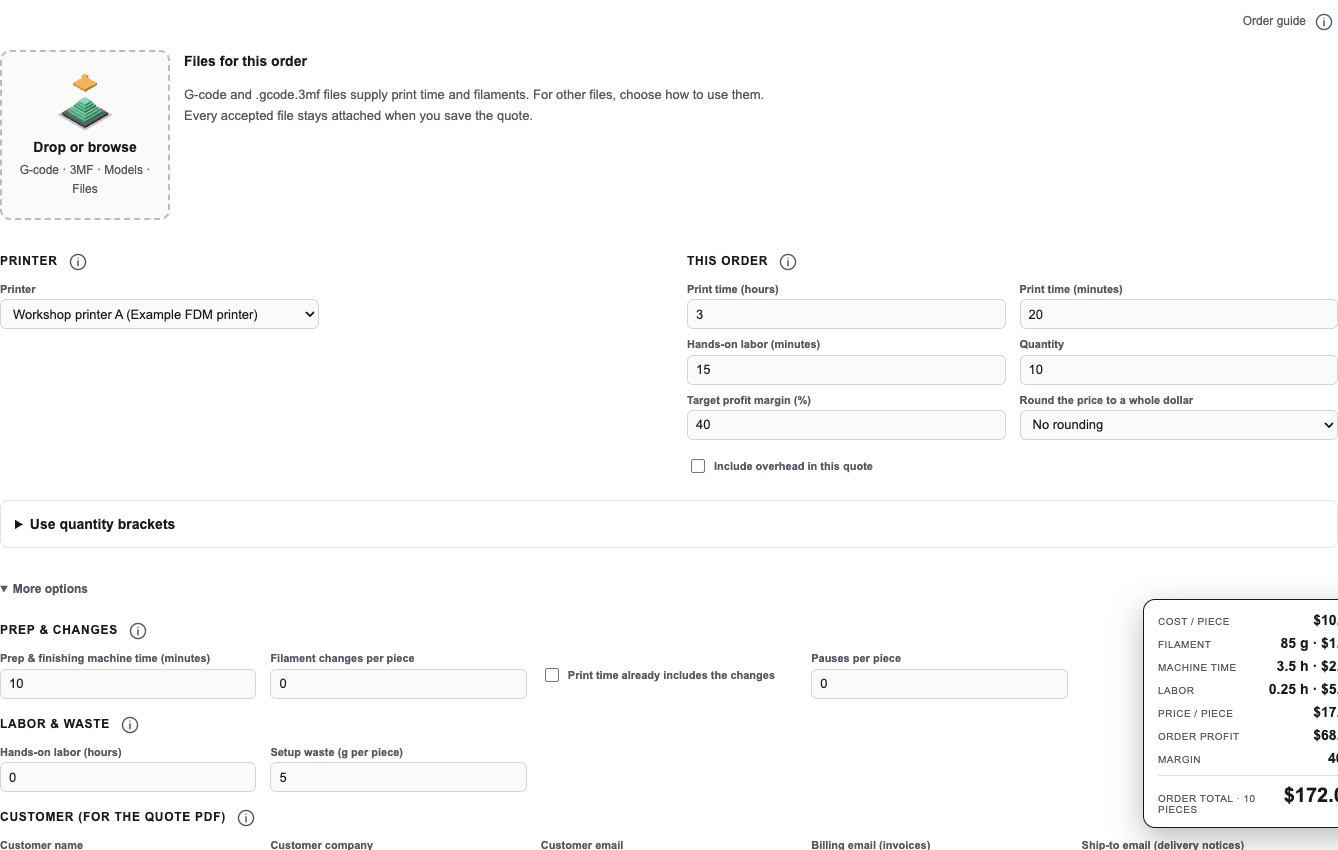
More options separates prep and filament changes and one-time costs. Hands-on labor and waste are under Pricing in the Quote section. Open full size - Review your rates in Preferences and the printer settings in Printers.
How to interpret the result
Enter printer duration as machine time and your own working time as labor. Review whether slicer time already includes filament changes.
Limits and assumptions
- The app relies on the durations and rates you supply.
- Do not add filament-change time a second time if it is already included in the slicer estimate.
Related help
Use the related workflow guides or create a support ticket if a result does not match the entered assumptions.
Formulas and worked examples
All amounts must use the same currency. Convert percentages to fractions when a formula uses a rate: 40% = 0.40.
Costs
Electricity
Electricity cost = (Printer watts ÷ 1,000) × Machine hours × Price per kWh
TeX source
C_{\mathrm{electricity}}=\frac{W}{1000}\,t\,r_{\mathrm{kWh}}Worked example: 150 W ÷ 1,000 × 4 h × $0.20/kWh = $0.12.
Machine hours include prep and filament-change time unless the slicer already includes the changes.
Live Excel example · edit inputs and see results
Blue cells are editable. Results recalculate as you type. Each example is a separate sheet; percentages entered as inputs use whole numbers, such as 40 for 40%.
| A · Description | B · Value / result | Excel formula in B | |
|---|---|---|---|
| 1 | Printer watts | Editable input | |
| 2 | Machine hours | Editable input | |
| 3 | Price per kWh ($) | Editable input | |
| 4 | Electricity cost ($) | =(B1/1000)*B2*B3 |
Use these examples to learn the formula. They do not change your saved quote. Division by zero shows a message instead of a misleading number.
Hands-on labor
Labor cost = Hands-on hours × Hourly labor rate
TeX source
C_{\mathrm{labor}}=\frac{m_{\mathrm{hands\!\!\!-on}}}{60}\,r_{\mathrm{hour}}Worked example: 15 minutes ÷ 60 × $24/hour = $6.00.
The app includes the attention time for entered pauses and manual filament changes. Machine print duration is not automatically hands-on labor.
Live Excel example · edit inputs and see results
Blue cells are editable. Results recalculate as you type. Each example is a separate sheet; percentages entered as inputs use whole numbers, such as 40 for 40%.
| A · Description | B · Value / result | Excel formula in B | |
|---|---|---|---|
| 1 | Hands-on minutes | Editable input | |
| 2 | Hourly rate ($) | Editable input | |
| 3 | Hands-on hours | =B1/60 | |
| 4 | Labor cost ($) | =B3*B2 |
Use these examples to learn the formula. They do not change your saved quote. Division by zero shows a message instead of a misleading number.
Change log (5 entries)
- Version 1.4
Updated navigation, header Save and bottom pricing/readiness instructions for the consolidated workspace.
- Version 1.3
Added WolframAlpha links using live inputs and increased equation, explanation and spreadsheet text sizes. Tightened image frames and spacing while retaining full-size enlargement.
- Version 1.2
Typeset formulas in TeX and added live Excel examples with editable inputs, cell formulas, results and copying to Excel.
- Version 1.1
Expanded the article layout to use the full available page width.
- Version 1.0
Started change tracking for the current article. This version includes structured guidance, topic tags, app screenshots, formulas and worked examples.
Did this article solve your problem?
Loading feedback…